

27.Oct.2026
In today's digitally connected business environment, IT security is essential for protecting company information, maintaining business continuity, and preventing financial losses. From emails and online applications to digital payments and business management systems, technology plays a vital role in everyday operations.
However, increased digital connectivity also creates opportunities for cybercriminals. A suspicious email, a fake WhatsApp message, or a single careless click can expose sensitive information and put an entire organisation at risk.
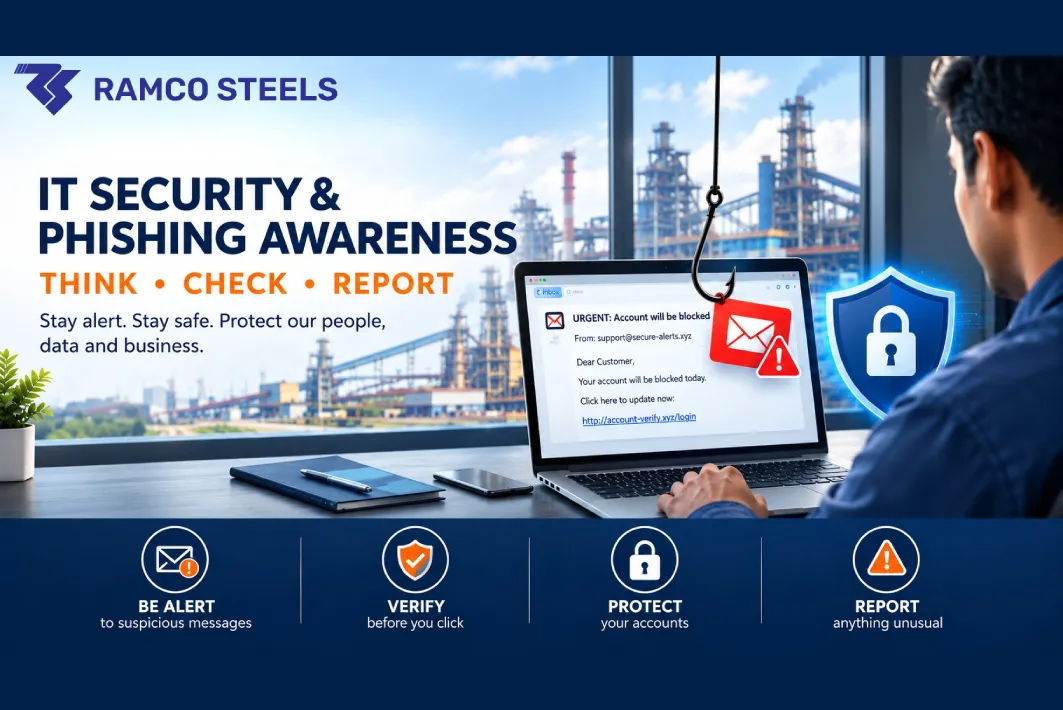
One of the most common cybersecurity threats is phishing, a technique in which attackers impersonate trusted individuals or organisations to trick people into revealing confidential information, clicking malicious links, or making fraudulent payments.
For manufacturing companies like Ramco Steels, cybersecurity is particularly important. A security incident can disrupt internal communication, affect production-related activities, compromise business records, and damage customer relationships.
The good news is that protecting your organisation does not always require advanced technical knowledge. Employees can significantly reduce cybersecurity risks by recognising suspicious messages, protecting their accounts, and following safe digital practices.
Let's explore the importance of IT security, the warning signs of phishing attacks, and the practical steps every employee can take to protect their organisation.
IT security refers to the practices and technologies used to protect computers, mobile devices, digital accounts, networks, and business information from unauthorised access, theft, or damage.
Think of IT security as the digital equivalent of securing your office. Locks restrict access to physical spaces, while passwords, security software, and authentication systems help protect digital assets.
Some essential IT security measures include:
Cybercriminals often exploit human behaviour rather than relying exclusively on technical vulnerabilities. Employees in accounts, HR, sales, purchasing, stores, and management may all be targeted.
For example, an attacker might impersonate a senior manager and ask an accounts employee to transfer money urgently. If the employee acts without verifying the request, the company could suffer a financial loss.
The takeaway: Cybersecurity is not just the responsibility of the IT department. Every employee has a role in protecting the organisation.
Phishing is a type of cyberattack in which criminals pretend to be trustworthy people or organisations to steal sensitive information, gain access to accounts, or commit financial fraud.
These attacks may appear to come from banks, government departments, courier companies, suppliers, colleagues, or senior management. Attackers typically try to convince recipients to click a link, open an attachment, disclose confidential information, or make a payment.
You receive an email claiming that your company email account will be blocked unless you verify your login details immediately.
A text message warns that your electricity connection or another service will be discontinued unless you make an urgent payment.
Someone pretending to represent a bank or technical support team asks for your password, OTP, or other confidential information.
A person uses a manager's photograph and a different phone number to request an urgent payment or the purchase of gift cards.
An unexpected invoice, purchase order, quotation, or delivery document contains a malicious link or attachment.
Watch for these common warning signs:
For example, you might receive an email claiming to be from your IT department that warns your password will expire within two hours. The message includes a link asking you to sign in. Instead of clicking the link, contact your IT team through an established communication channel to verify the request.
Remember: If a message creates urgency, requests confidential information, or asks you to take an unusual action, stop and verify it before responding.
Passwords are among the first lines of defence against unauthorised access. Weak, predictable, or reused passwords can put business accounts and confidential information at risk.
Avoid passwords based on easily guessed information, such as your name, date of birth, or common combinations like "123456". Instead, use long, unique passwords or passphrases and follow your organisation's password policy.
An OTP, or one-time password, is a temporary code used to verify your identity during a login or transaction.
Although OTPs provide an additional layer of security, sharing them with the wrong person can allow an attacker to access an account or authorise an action. Never share an OTP with someone who contacts you unexpectedly, even if they claim to represent your bank, employer, or IT support team.
Where available, enable multi-factor authentication to provide an additional layer of protection for important accounts. If someone asks for your OTP to prevent your account from being blocked, stop the conversation and contact the organisation through an official channel.
Good IT security habits extend beyond passwords and emails. How employees use computers, mobile devices, removable storage, and internet connections can also affect business security.
Cybercriminals may disguise harmful files as invoices, purchase orders, resumes, or other legitimate business documents. Before opening an attachment, consider whether you expected the file and whether the sender and request are genuine.
Avoid enabling macros or other active content in unfamiliar documents simply because the file asks you to do so. Download software only from trusted, approved sources. Unauthorised or pirated applications may expose devices to malicious software.
An unfamiliar USB drive may contain malicious software that can compromise a computer or expose business information.
Do not connect unidentified pen drives found in public areas or received from unknown sources to company computers. Use company-approved storage devices and consult your IT team if you need to check an unfamiliar device.
Public Wi-Fi networks at hotels, airports, cafes, and other public locations may not provide the same level of protection as trusted networks.
Avoid accessing sensitive company systems or conducting important business transactions over untrusted connections. When remote access is necessary, use an organisation-approved secure connection or mobile data, following your company's security policies.
Software updates frequently include fixes for known security vulnerabilities. Install approved updates for operating systems, browsers, and business applications promptly. Keep mobile devices protected with a screen lock and avoid installing applications from untrusted sources.
Digital payments require particular attention because fraudulent transactions can cause immediate financial losses.
When using UPI:
A few seconds spent checking a transaction can help prevent avoidable financial losses.
WhatsApp and other messaging platforms make workplace communication faster and more convenient. However, cybercriminals can misuse these platforms to impersonate trusted people.
Imagine receiving a WhatsApp message from a new number displaying your manager's photograph. The sender claims to be attending an important meeting and asks you to transfer money immediately or purchase gift cards on their behalf.
Because the profile picture looks familiar and the request appears urgent, you might feel pressured to act. However, the person behind the number may be a fraudster.
Follow these precautions before acting on unusual requests:
Call them using a previously confirmed phone number.
Speak directly with the relevant manager before making unusual payments.
Never bypass established financial controls because of an urgent message.
Do not share business documents or sensitive information with unverified contacts.
Inform your IT team about suspected impersonation attempts.
Cybercriminals may also use AI-generated voices to imitate managers or colleagues. A familiar-sounding voice does not automatically prove that a request is genuine. Always verify unusual financial instructions through a separate, trusted communication channel.
Social media posts and workplace photographs can unintentionally expose confidential information. A photograph taken at your desk might reveal customer documents, identification cards, passwords, computer screens, or details about company operations.
Before posting anything online, check the background and ensure that you are not exposing information that should remain private. Responsible online behaviour is an important part of protecting your organisation.
Cybersecurity is not limited to protecting computers and digital accounts. For manufacturing businesses, a cyberattack can affect business continuity, internal coordination, customer service, and operational efficiency.
Consider a manufacturing company where an employee opens a malicious email attachment. The malware spreads through the company's systems and makes important files inaccessible, including billing records, inventory information, and business documents.
Employees may then struggle to process orders, coordinate dispatches, respond to customers, or complete routine administrative work. One possible cause is ransomware, a type of malicious software that encrypts or locks files and demands payment for their restoration.
Other cyber incidents may result in:
Manufacturing businesses can strengthen their security practices by implementing the following measures:
Back up important business information according to company procedures and ensure that backups are protected against unauthorised access.
Keep security tools updated and follow organisational guidelines for protecting computers and other devices.
Train employees to recognise phishing attempts, suspicious attachments, fraudulent payment requests, and other common cyber threats.
Keep operating systems and applications updated to address known security weaknesses.
Use strong authentication, screen locks, and appropriate access controls on company devices.
Report suspicious emails, lost devices, unusual account activity, and suspected malware infections to the appropriate IT personnel.
The result: Strong cybersecurity practices help protect business information, support operational continuity, and maintain customer trust.
Even careful employees can make mistakes. Clicking a suspicious link or opening an unexpected attachment does not automatically mean that a cyberattack has succeeded, but it should never be ignored. Taking the right steps quickly can help reduce the potential damage.
Do not enter additional information, download more files, or continue interacting with a suspicious website.
If you suspect that your device has been compromised, follow your company's incident-response instructions. If instructed or permitted by those procedures, disconnect the affected device from the network.
Contact your IT Helpdesk or designated IT support team. Explain what happened, including whether you opened an attachment, entered your password, or shared an OTP.
If you entered your password, change it using a trusted device and follow your IT team's guidance. Report any exposed financial information or authentication codes.
Do not attempt to investigate or remove suspected malware yourself unless instructed to do so. Allow the appropriate technical team to assess the situation.
If you suspect a fraudulent transaction or believe your banking details have been compromised, contact your bank immediately and report the incident through the appropriate official channels.
Do not delay reporting because you are concerned about making a mistake. Early reporting can help limit damage, protect other employees, and prevent a security incident from becoming a larger business problem.
Technology alone cannot eliminate every cybersecurity risk. Employees' daily decisions also play an important role in protecting business systems and information.
A strong cybersecurity culture encourages employees to remain alert, follow established procedures, and report suspicious activity without unnecessary delay.
Organisations can support this culture by:
Cybersecurity awareness should be relevant to employees across all departments, including accounts, HR, purchasing, stores, sales, production, and management. When employees understand the risks and know how to respond, they become an important part of the organisation's overall security strategy.
IT security and phishing awareness are essential for protecting modern businesses against online fraud, data theft, and operational disruption.
For manufacturing companies like Ramco Steels, maintaining cybersecurity requires more than installing software. It also involves building safe workplace habits, protecting confidential information, and ensuring that employees know how to identify and report suspicious activity.
By using strong passwords, avoiding unfamiliar links, verifying unusual payment requests, keeping devices updated, and reporting incidents promptly, employees can help reduce the risks associated with cyberattacks.
Remember these three simple rules:
Think before you click. Check before you trust. Report whenever something seems wrong.
A few seconds spent verifying a message or payment request can help prevent financial losses and unnecessary business disruption.
At Ramco Steels, cybersecurity awareness is an important part of protecting company information, supporting business operations, and maintaining trusted relationships with customers and business partners.
Stay alert. Stay informed. Stay secure.
IT security involves protecting computers, mobile devices, digital accounts, networks, and business information from unauthorised access, theft, and damage.
Phishing is a cyberattack in which criminals impersonate trusted individuals or organisations to trick people into revealing confidential information, clicking malicious links, opening harmful attachments, or making fraudulent payments.
Look for suspicious sender addresses, unusual website links, urgent demands, unexpected attachments, and requests for confidential information. When in doubt, verify the message through a trusted communication channel.
An OTP helps verify a user's identity during certain login or transaction processes. Sharing it with an unauthorised person may allow them to access an account or approve an action. Never disclose OTPs to people who contact you unexpectedly.
Manufacturing companies can improve cybersecurity through employee training, strong authentication, regular software updates, secure data backups, appropriate access controls, approved security software, and documented incident-response procedures.
Stop interacting with the suspicious content and report the incident to your IT team immediately. If you entered your password or financial details, explain what happened and follow the team's instructions to secure your accounts.
Not necessarily. Scammers can copy profile photographs and impersonate managers, colleagues, or suppliers using different phone numbers. Verify unusual requests by contacting the person through a previously confirmed number.
Employees across every department use digital systems, handle information, and communicate with customers, suppliers, and colleagues. Recognising scams and following basic security practices can help prevent financial fraud, data theft, and business disruption.
Yes. A successful phishing attack may compromise email accounts, expose confidential information, facilitate fraudulent payments, or introduce malware. Depending on the incident, these effects can disrupt routine business activities and damage customer trust.
Always verify unexpected requests involving confidential information, account credentials, or financial transactions. Never rush into clicking unfamiliar links or approving unusual requests, and report suspicious activity promptly.
Protect your business with better cybersecurity awareness. Cybersecurity begins with informed employees and responsible digital practices. Stay alert to phishing attempts, follow your organisation's IT security guidelines, and help create a safer digital workplace.
Visit the Ramco Steels website to learn more about the company's products and business activities.



Corporate Office
Plot No. 75, Sector 25,


